
In this article, we connect an KY-031 Knock Sensor to a Raspberry Pi Pico 2, any rp2350 type board will be suitable.
There are many good ones, I actually used a Pimoroni one as it was on hand
Overview
We will use Micropython for these examples but of course you can use the Arduino IDE as well if you have Raspberry Pi Pico support enabled
A knock sensor is a specialized device used to detect engine knock or pinging in internal combustion engines. Engine knock occurs when fuel-air mixture in the cylinder ignites prematurely or unevenly, creating shock waves that can damage engine components over time.
The knock sensor identifies these abnormal vibrations or sound waves and sends a signal to the engine control unit (ECU), which can adjust ignition timing, fuel injection, or other parameters to prevent engine damage.
The knock sensor is typically a piezoelectric device, meaning it generates an electrical signal when subjected to mechanical stress or vibrations.
It is mounted on the engine block or cylinder head to closely monitor vibrations caused by combustion. Knock sensors play a critical role in optimizing engine performance, improving fuel efficiency, and reducing emissions by allowing the engine to operate safely closer to its optimal power output.
They are standard components in modern vehicles, contributing to the smooth and efficient functioning of advanced engine management systems.
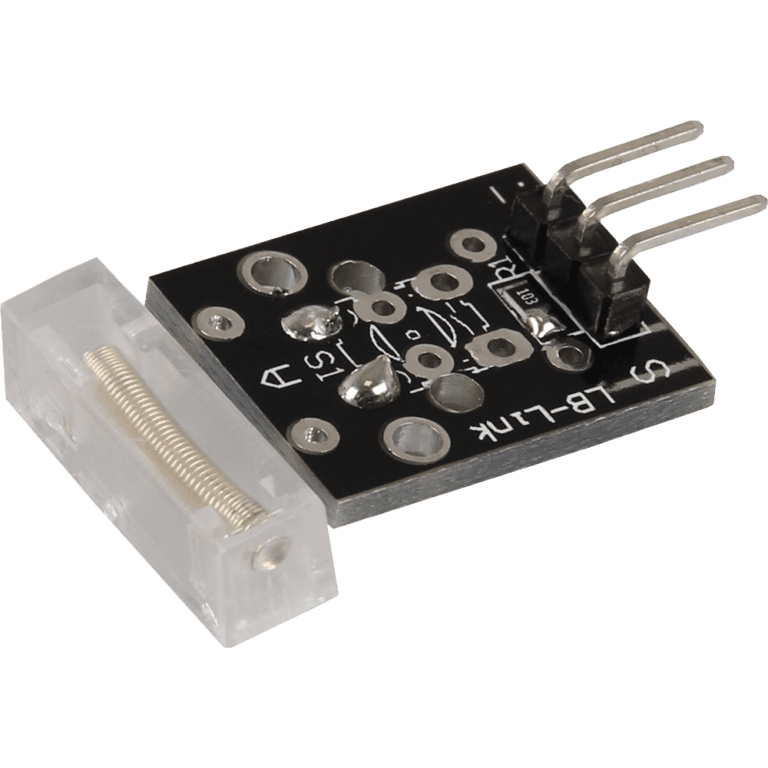
The sensor looks like this
Parts Required
You can connect to the module using dupont style jumper wire.
| Name | Link |
| Raspberry Pi Pico 2 | |
| 37 in one sensor kit | |
| Connecting cables |
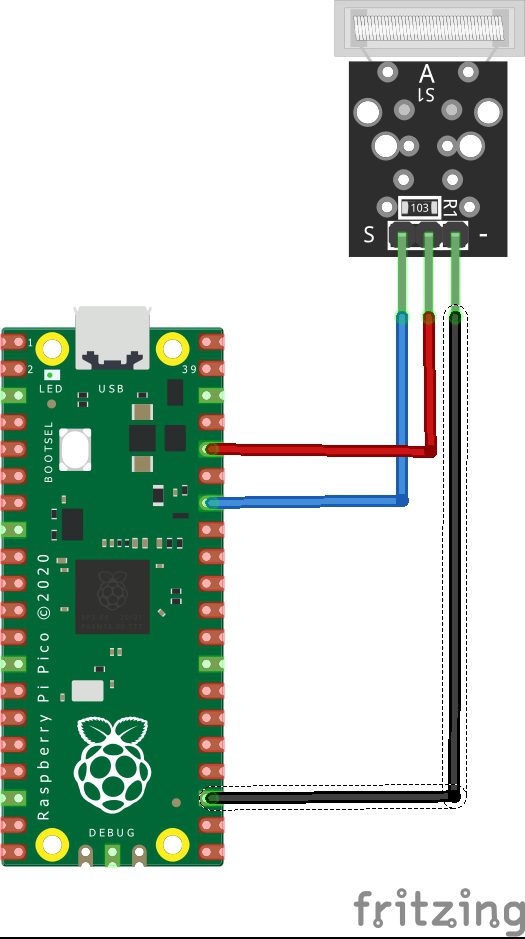
Schematic/Connection
| Pico | SENSOR |
|---|---|
| GPIO28 | S |
| 3.3V | middle pin |
| GND | – |
The part I had was Pico but the pinout for a Pico 2 is the same – so this works just fine
Code Examples
Basic example in thonny
from machine import Pin, Timer
import time

# Initialization of GPIO28 as input
button = Pin(28, Pin.IN, Pin.PULL_DOWN)

# Timer initialization
timer = Timer()
# Variables initialization
i = 0

def func(pin):
    global i
    i = i + 1
    print(i)


if button.value() == 1:
    # Initialization interrupt
    button.irq(handler=func, trigger=button.IRQ_FALLING)

# REPL
print("Tap the sensor")
print("-------------------------------------")
REPL Output
You will get multiple counts per tap – due to the bounce of the sensor and how hard you tap it
Type “help()” for more information.
>>> %Run -c $EDITOR_CONTENT
Tap the sensor
————————————-
>>> 1
2
3
4