
In this article, we connect an KY-011 Dual Color LED to a Raspberry Pi Pico 2, any rp2350 type board will be suitable. There are many good ones, I actually used a Pimoroni one as it was on hand
Overview
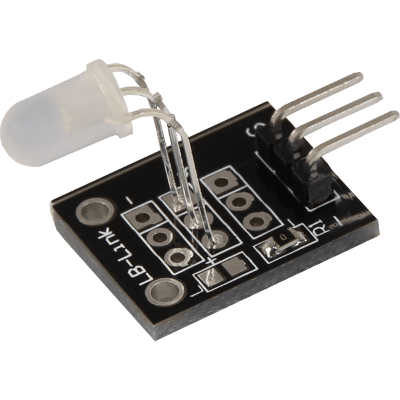
The KY-011 Dual Color LED module can emit red and green light. You can adjust the intensity of each color using a Pico PWM pin or simply switch the LED on/off using standard GPIO.
We will use Micropython for these examples but of course you can use the Arduino IDE as well if you have Raspberry Pi Pico support enabled
The sensor looks like this
| Operating Voltage | 2.0v ~ 2.5v |
| Working Current | 10mA |
| Color | Red + Green |
| Beam Angle | 150 |
| Wavelength | 571nm + 644nm |
| Luminosity Intensity (MCD) | 20-40; 40-80 |
Series resistors are recommended, about 120 ohms is the recommended value.
| Series resistor (3.3 V) [Red] | 120 Ω |
| Series resistor (3,3 V) [Green] | 120 Ω |
Parts Required
You can connect to the module using dupont style jumper wire.
| Name | Link | |
| Raspberry Pi Pico 2 | ||
| 37 in one sensor kit | ||
| Connecting cables |
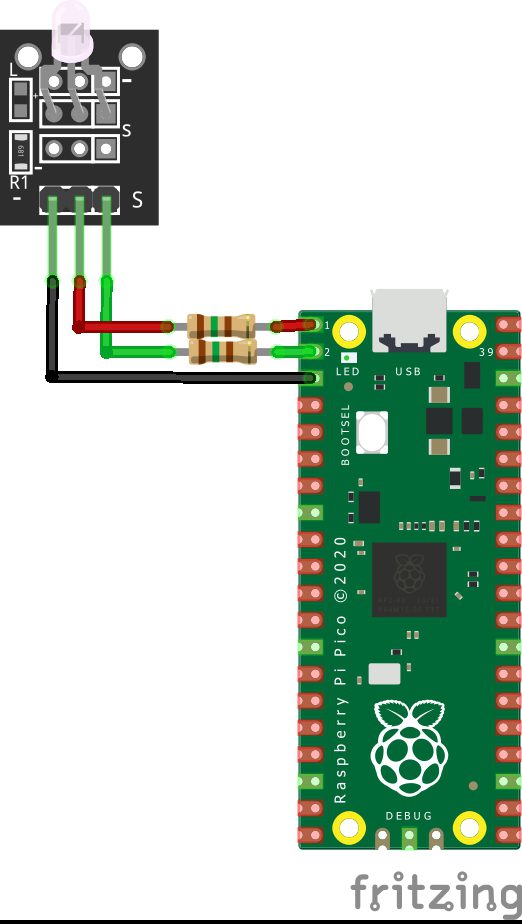
Schematic/Connection
| Pico | SENSOR |
|---|---|
| GPIO0 | LED Red |
| GPIO1 | LED Green |
| GND | GND |
I didn’t have parts for 120 ohms resistors in fritzing, so they are 150 ohms. It still worked. I also saw no side effects with no resistors fitted but I would recommend fitting a couple for peace of mind.
The part I had was Pico but the pinout for a Pico 2 is the same – so this works fine
Code Examples
Basic example in thonny
from machine import Pin, PWM
from time import sleep

# Initialization of GPIO0 and GPIO1 as output
Green = Pin(1, Pin.OUT)
Red = Pin(0, Pin.OUT)

while True:
    Green.value(1)
    Red.value(0)
    sleep(1)
    Green.value(0)
    Red.value(1)
    sleep(1)
    Green.value(0)
    Red.value(0)
Here is an example that uses PWM
import machine
import math

# Initialization of GPIO0 and GPIO1 as PWM pins
Red = machine.PWM(machine.Pin(0))
Red.freq(1000)
Green = machine.PWM(machine.Pin(1))
Green.freq(1000)

RG = [0,0]

def sinColour(number):
    a = (math.sin(math.radians(number))+1)*32768
    c = (math.sin(math.radians(number+90))+1)*32768
    RG = (int(a),int(c))
    return RG

# Infinite loop
a = 0
while True:
    RG = sinColour(a)
    a = a + 0.01
    if a == 360:
        a = 0
    Red.duty_u16(RG[0])
    Green.duty_u16(RG[1])
REPL Output
N/A