
In this article we look at a 1.3inch OLED Display Module For the Raspberry Pi Pico from waveshare, it measures 64×128 Pixels, it uses SPI/I2C Interface.
Here is what it looks like
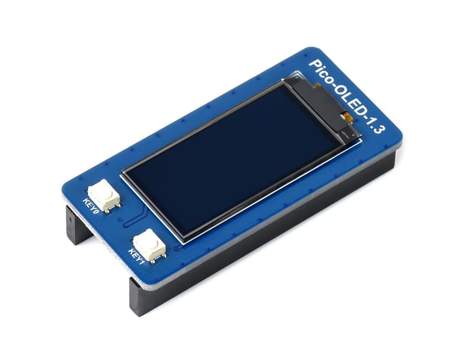
It is a 1.3″ OLED Display Module which uses a SH1107 Driver and has a SPI or I2C bus option.
The board also has 2 buttons that the user can use for their needs – User key 0 and 1 in the pinout below.
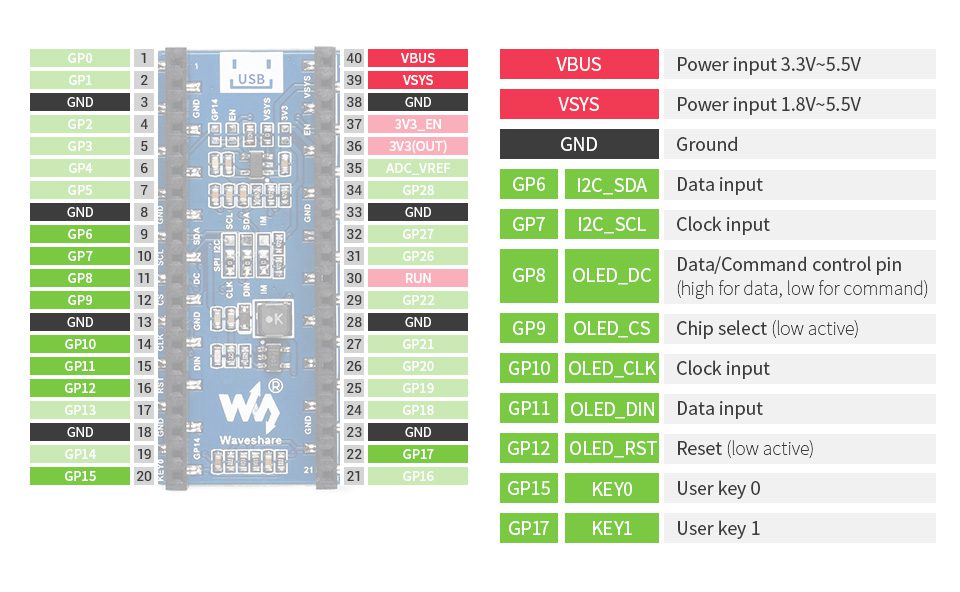
Specifications
Operating Voltage:3.3V
Communication Interface: 4-Wire SPI, I2C
Display Panel: OLED
Driver: SH1107
Resolution: 64×128 pixels
Raspberry Pi Pico C/C++ and MicroPython demo code examples are available to help you get started from the link at the bottom.
Code
This is the default example which is also available from the download page at he bottom of the article
from machine import Pin,SPI
import framebuf
import time

DC = 8
RST = 12
MOSI = 11
SCK = 10
CS = 9


class OLED_1inch3(framebuf.FrameBuffer):
    def __init__(self):
        self.width = 128
        self.height = 64

        self.cs = Pin(CS,Pin.OUT)
        self.rst = Pin(RST,Pin.OUT)

        self.cs(1)
        self.spi = SPI(1)
        self.spi = SPI(1,2000_000)
        self.spi = SPI(1,20000_000,polarity=0, phase=0,sck=Pin(SCK),mosi=Pin(MOSI),miso=None)
        self.dc = Pin(DC,Pin.OUT)
        self.dc(1)
        self.buffer = bytearray(self.height * self.width // 8)
        super().__init__(self.buffer, self.width, self.height, framebuf.MONO_HMSB)
        self.init_display()

        self.white =   0xffff
        self.balck =   0x0000

    def write_cmd(self, cmd):
        self.cs(1)
        self.dc(0)
        self.cs(0)
        self.spi.write(bytearray([cmd]))
        self.cs(1)

    def write_data(self, buf):
        self.cs(1)
        self.dc(1)
        self.cs(0)
        self.spi.write(bytearray([buf]))
        self.cs(1)

    def init_display(self):
        """Initialize dispaly"""
        self.rst(1)
        time.sleep(0.001)
        self.rst(0)
        time.sleep(0.01)
        self.rst(1)

        self.write_cmd(0xAE)#turn off OLED display

        self.write_cmd(0x00)   #set lower column address
        self.write_cmd(0x10)   #set higher column address

        self.write_cmd(0xB0)   #set page address

        self.write_cmd(0xdc)    #et display start line
        self.write_cmd(0x00)
        self.write_cmd(0x81)    #contract control
        self.write_cmd(0x6f)    #128
        self.write_cmd(0x21)    # Set Memory addressing mode (0x20/0x21) #

        self.write_cmd(0xa0)    #set segment remap
        self.write_cmd(0xc0)    #Com scan direction
        self.write_cmd(0xa4)   #Disable Entire Display On (0xA4/0xA5)

        self.write_cmd(0xa6)    #normal / reverse
        self.write_cmd(0xa8)    #multiplex ratio
        self.write_cmd(0x3f)    #duty = 1/64

        self.write_cmd(0xd3)    #set display offset
        self.write_cmd(0x60)

        self.write_cmd(0xd5)    #set osc division
        self.write_cmd(0x41)

        self.write_cmd(0xd9)    #set pre-charge period
        self.write_cmd(0x22)

        self.write_cmd(0xdb)    #set vcomh
        self.write_cmd(0x35)

        self.write_cmd(0xad)    #set charge pump enable
        self.write_cmd(0x8a)    #Set DC-DC enable (a=0:disable; a=1:enable)
        self.write_cmd(0XAF)
    def show(self):
        self.write_cmd(0xb0)
        for page in range(0,64):
            self.column = 63 - page
            self.write_cmd(0x00 + (self.column & 0x0f))
            self.write_cmd(0x10 + (self.column >> 4))
            for num in range(0,16):
                self.write_data(self.buffer[page*16+num])


if __name__=='__main__':

    OLED = OLED_1inch3()
    OLED.fill(0x0000)
    OLED.show()
    OLED.rect(0,0,128,64,OLED.white)
    time.sleep(0.5)
    OLED.show()
    OLED.rect(10,22,20,20,OLED.white)
    time.sleep(0.5)
    OLED.show()
    OLED.fill_rect(40,22,20,20,OLED.white)
    time.sleep(0.5)
    OLED.show()
    OLED.rect(70,22,20,20,OLED.white)
    time.sleep(0.5)
    OLED.show()
    OLED.fill_rect(100,22,20,20,OLED.white)
    time.sleep(0.5)
    OLED.show()
    time.sleep(1)

    OLED.fill(0x0000)
    OLED.line(0,0,5,64,OLED.white)
    OLED.show()
    time.sleep(0.01)
    OLED.line(0,0,20,64,OLED.white)
    OLED.show()
    time.sleep(0.01)
    OLED.line(0,0,35,64,OLED.white)
    OLED.show()
    time.sleep(0.01)
    OLED.line(0,0,65,64,OLED.white)
    OLED.show()
    time.sleep(0.01)
    OLED.line(0,0,95,64,OLED.white)
    OLED.show()
    time.sleep(0.01)
    OLED.line(0,0,125,64,OLED.white)
    OLED.show()
    time.sleep(0.01)
    OLED.line(0,0,125,41,OLED.white)
    OLED.show()
    time.sleep(0.1)
    OLED.line(0,0,125,21,OLED.white)
    OLED.show()
    time.sleep(0.01)
    OLED.line(0,0,125,3,OLED.white)
    OLED.show()
    time.sleep(0.01)

    OLED.line(127,1,125,64,OLED.white)
    OLED.show()
    time.sleep(0.01)
    OLED.line(127,1,110,64,OLED.white)
    OLED.show()
    time.sleep(0.01)
    OLED.line(127,1,95,64,OLED.white)
    OLED.show()
    time.sleep(0.01)
    OLED.line(127,1,65,64,OLED.white)
    OLED.show()
    time.sleep(0.01)
    OLED.line(127,1,35,64,OLED.white)
    OLED.show()
    time.sleep(0.01)
    OLED.line(127,1,1,64,OLED.white)
    OLED.show()
    time.sleep(0.01)
    OLED.line(127,1,1,44,OLED.white)
    OLED.show()
    time.sleep(0.01)
    OLED.line(127,1,1,24,OLED.white)
    OLED.show()
    time.sleep(0.01)
    OLED.line(127,1,1,3,OLED.white)
    OLED.show()
    time.sleep(1)
    OLED.fill(0x0000)
    OLED.text("128 x 64 Pixels",1,10,OLED.white)
    OLED.text("Pico-OLED-1.3",1,27,OLED.white)
    OLED.text("SH1107",1,44,OLED.white)
    OLED.show()

    time.sleep(1)
    OLED.fill(0x0000)
    keyA = Pin(15,Pin.IN,Pin.PULL_UP)
    keyB = Pin(17,Pin.IN,Pin.PULL_UP)
    while(1):
        if keyA.value() == 0:
            OLED.fill_rect(0,0,128,20,OLED.white)
            print("A")
        else :
            OLED.fill_rect(0,0,128,20,OLED.balck)


        if(keyB.value() == 0):
            OLED.fill_rect(0,44,128,20,OLED.white)
            print("B")
        else :
            OLED.fill_rect(0,44,128,20,OLED.balck)
        OLED.fill_rect(0,22,128,20,OLED.white)
        OLED.text("press the button",0,28,OLED.balck)

        OLED.show()


    time.sleep(1)
    OLED.fill(0xFFFF)
Products
You can pick up the PICO OLED 1.3 display from the link below, it will cost about $15